
Potential risks with sharing email in plaintext
So, you want to share your email on your website, but you’re worried about spam?
Sharing your email address in plaintext (without any encryption) can be risky. When you post your email openly on a website or blog, it becomes visible to web crawlers and spambots. These bots scour the internet, collecting email addresses to send spam and unwanted marketing emails. Over time, this can lead to your inbox being flooded with irrelevant messages.
In this guide, I’ll show you how you can protect your email address using a simple encryption technique called ROT47, which hides it from bots but still accessible to users who need it.
Note! This guide assumes that:
- you have the ability to modify the source code of your website
- your visitors have JavaScript enabled, which is generally true for most users
What is ROT47?
ROT47 is a simple encryption algorithm that shifts each character in your text by 47 positions in the ASCII table. This makes it an excellent tool for hiding email addresses from bots, as they usually aren’t designed to decode ROT47.
Step-by-step guide
Now, let’s go through the process of safely sharing your email address using ROT47 encryption. We will use a tool called Dencode to encrypt your email, and then embed it in your website code.
Step 1: Encrypt your email address using ROT47
Visit the ROT47 encoder tool Go to the following website: https://dencode.com/en/cipher/rot47.
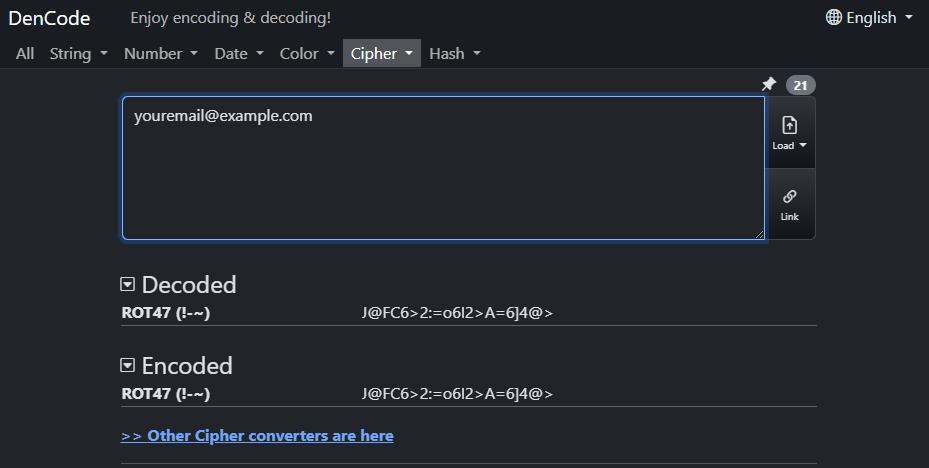
The tool will generate the ROT47-encoded email address. For example, if you input youremail@example.com, the encoded result will be J@FC6>2:=o6I2>A=6]4@>.
Step 2: Add the encoded email to your website code
Now that you have the ROT47-encoded email, you can insert it into your website using the following code.
<!-- Message displayed if JavaScript is disabled -->
<noscript>
    <p>You need JavaScript enabled to see my email.</p>
</noscript>

<!-- Encrypted email (hidden from user but visible to bots) -->
<p id="encrypted-email" style="display:none;"></p>

<!-- Button to reveal email and copy to clipboard -->
<button  id="reveal-email" style="color: black; font-weight: 700; background-color: #b4befe; border: none; border-radius: 5px; padding: .3rem .7rem; transition: 0.5s; cursor: pointer; font-family: 'JetBrains', monospace;">Click to see my email</button>

<!-- Hidden area for email (revealed on button click) -->
<p id="email" style="display:none;"></p>

<!-- Feedback message for copying to clipboard -->
<p id="copy-message" style="display:none; color: #42dd11;">Email copied to clipboard!</p>

<script>
    var encodedEmail = "J@FC6>2:=o6I2>A=6]4@>";  // Put your ROT47-encoded email here

    // ROT47 Decoder
    function rot47decode(text) {
        return text.split('').map(function(char) {
            var code = char.charCodeAt(0);
            if (code >= 33 && code <= 126) {
                return String.fromCharCode(33 + ((code - 33 + 47) % 94));
            } else {
                return char; // Non-ASCII characters remain unchanged
            }
        }).join('');
    }

    // When the button is clicked, reveal the email and copy to clipboard
    document.getElementById("reveal-email").addEventListener("click", function() {
        // Decode the ROT47 encoded email
        var decodedEmail = rot47decode(encodedEmail);

        // Reveal the original email after decoding
        var emailElement = document.getElementById("email");
        emailElement.textContent = decodedEmail;
        emailElement.style.display = "block"; // Make it visible

        // Copy the original email to the clipboard
        navigator.clipboard.writeText(decodedEmail).then(function() {
            // Show the confirmation message
            document.getElementById("copy-message").style.display = "block";
        }).catch(function(err) {
            console.error('Could not copy text: ', err);
        });

        // Optionally, hide the button after it is clicked
        this.style.display = "none";
    });
</script>
In the code above, locate variable encodedEmail in the line with var encodedEmail = "J@FC6>2:=o6I2>A=6]4@>";. You should replace this value with the ROT47-encoded email.
Understanding the code
The above script does the following:
Displays a Button: A button labeled “Click to see my email” is shown, which users can click to reveal the encoded email.
Decodes the Email: When the button is clicked, the JavaScript
rot47decodefunction decodes the ROT47-encrypted email back to its original form (e.g.,youremail@example.com).Shows the Email: The decoded email is then displayed in the webpage, making it visible to the user.
Copies to Clipboard: The decoded email is automatically copied to the user’s clipboard, and a confirmation message (“Email copied to clipboard!”) appears.
Conclusion
With this setup, your email is hidden from bots, but still accessible to real users who click the button to reveal it. This reduces the risk of spam while making it easy for legitimate contacts to get in touch with you.
Happy email sharing!